Getting Started
1
Unbox & connect
Mount your owa344 on the developer board, connect interface cables, antennas and power supply
2
Access & configure
Connect via USB serial console or SSH — configure networking, cellular and peripherals
3
Develop & test
Use the cross compiler and APIs to write your application in C, Python or your preferred language — test with real hardware I/O
4
Ship to production
Validate, package and deploy on standalone owa344A or owa344I gateways in the field
1
Unbox & connect
Mount your owa344 on the developer board, connect interface cables, antennas and power supply
2
Access & configure
Connect via USB serial console or SSH — configure networking, cellular and peripherals
3
Develop & test
Use the cross compiler and APIs to write your application in C, Python or your preferred language — test with real hardware I/O
4
Ship to production
Validate, package and deploy on standalone owa344A or owa344I gateways in the field
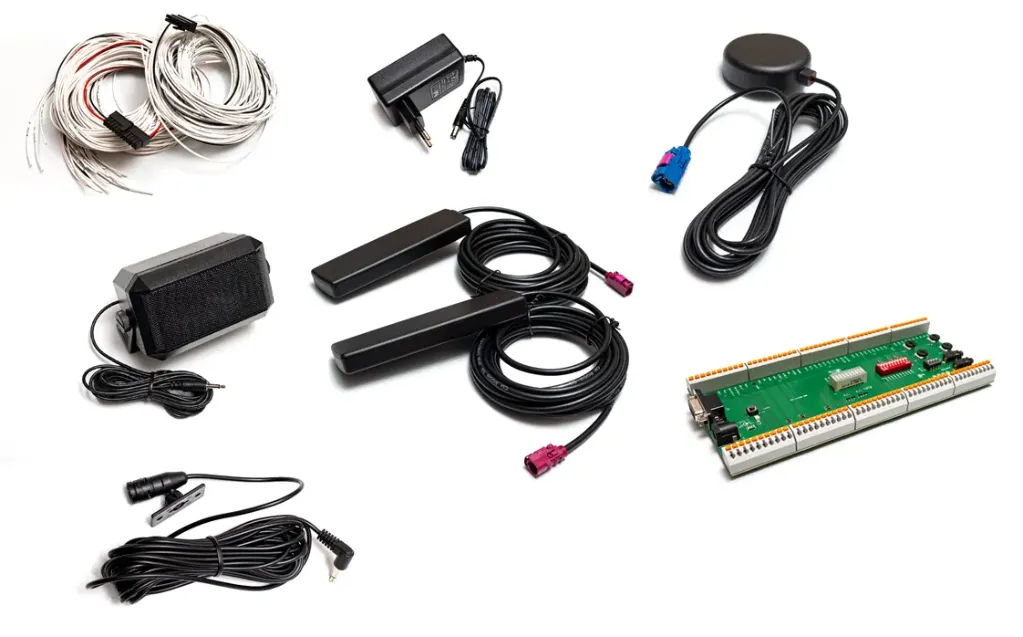
Included hardware
owa344 Developer board
Breakout board with full access to all owa344 interfaces — Molex Microfit 24-way connector
Power supply cables
Ready-to-use power cables for 9–48V DC input — immediate workbench setup
Interface cables
Pre-wired cables for RS232, CAN, digital I/O, analog inputs and Ethernet connections
Antennas
LTE cellular antenna and GNSS antenna (344A) for wireless connectivity testing
USB cables
USB to RS232 serial console cable for direct gateway access and debugging
Documentation
Quick start guide, pinout reference and hardware integration manual
owa344 Developer board
Breakout board with full access to all owa344 interfaces — Molex Microfit 24-way connector
Power supply cables
Ready-to-use power cables for 9–48V DC input — immediate workbench setup
Interface cables
Pre-wired cables for RS232, CAN, digital I/O, analog inputs and Ethernet connections
Antennas
LTE cellular antenna and GNSS antenna (344A) for wireless connectivity testing
USB cables
USB to RS232 serial console cable for direct gateway access and debugging
Documentation
Quick start guide, pinout reference and hardware integration manual
Software & development environment
Yocto Linux (Kirkstone 4.0)
Lightweight embedded Linux OS optimized for the ARM Cortex A7 platform — with can-utils, iptables and essential system tools
C & Python development
Develop your application in C or Python using Owasys' APIs and libraries — full flexibility to build custom solutions
Developer Zone access
Cross compiler, toolchain, latest firmware, ready-to-use development environment and full product documentation
Application notes & samples
Detailed code examples covering I/O control, GPS positioning, CAN bus communication, power management and cellular connectivity
Security tools
Secure boot support and optional TPM 2.0 integration — cybersecurity by design from the start of your development
VYNZE engineering support
Access to technical documentation and direct engineering support from VYNZE to accelerate your integration project
Yocto Linux (Kirkstone 4.0)
Lightweight embedded Linux OS optimized for the ARM Cortex A7 platform — with can-utils, iptables and essential system tools
C & Python development
Develop your application in C or Python using Owasys' APIs and libraries — full flexibility to build custom solutions
Developer Zone access
Cross compiler, toolchain, latest firmware, ready-to-use development environment and full product documentation
Application notes & samples
Detailed code examples covering I/O control, GPS positioning, CAN bus communication, power management and cellular connectivity
Security tools
Secure boot support and optional TPM 2.0 integration — cybersecurity by design from the start of your development
VYNZE engineering support
Access to technical documentation and direct engineering support from VYNZE to accelerate your integration project